Connecting Holidu to SIBA (Sistema de Informação de Boletins de Alojamento) lets you collect guest information automatically and send it to the official Portuguese accommodation reporting portal. This helps you meet Portugal's local guest registration rules without manual data entry for every booking. This guide explains the prerequisites, shows how to set up the connection, and describes what guests and hosts see at each stage.
Before You Start: What Are the Prerequisites?
Before you activate guest online registration with Holidu, your property must already be registered on the official SIBA portal and you need your SIBA credentials. You also need to know which bulletin submission method (Método de envio) is active in your SIBA account, because it must match the method you choose in Holidu.
Make sure that:
- You already have a property registered on the official SIBA portal: https://siba.ssi.gov.pt
- You have the following SIBA credentials available:
- NIF of the Hotel Unit
- Establishment Code
- You have your Authentication Key (usually a 12-digit password). These credentials should be the same ones you use to access the official SIBA portal.
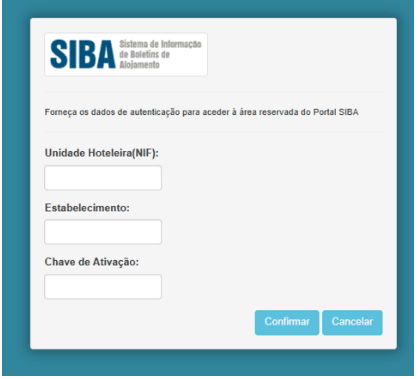
- You know which bulletin submission method (Método de envio) is active in your SIBA portal account. Both "SEF-SIBA web service integration" and "SEF-SIBA Página no portal integration" can be connected to Holidu, but the method you select in the Holidu app must match the one configured in SIBA.
- Log in to the SEF account at https://siba.ssi.gov.pt/s/an/default.aspx to check the current submission method.
- If you need to change the submission method and cannot do it yourself, contact SIBA directly at https://siba.ssi.gov.pt/contactos.
How to Configure Guest Online Registration Between Holidu and SIBA
To connect a property, open Online Check-in in your Holidu app, click Configure next to the property, enter your SIBA details, and select the sending method that matches your SIBA account. Once validation shows "Completed!" and you save the changes, the connection becomes active.
- In your Holidu app, go to "Tools" in the left-side menu and click "Online Check-in".

- You will see a list of your properties. Click "Configure" next to the property you want to connect.
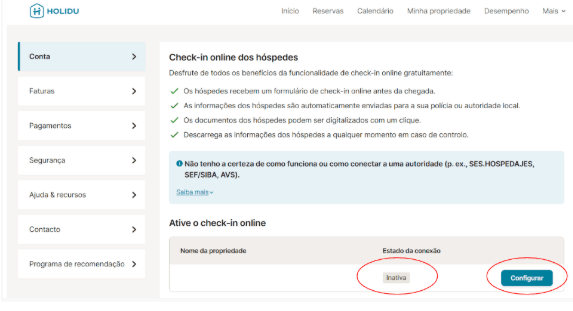
- Fill in the form with your property information and your SIBA Portal credentials, then enable "Send data automatically to the responsible authority".

- Select the sending method. For Portugal there are two possible connection methods, and each requires different fields:
- SEF-SIBA web service integration (see Option A below)
- SEF-SIBA Página no portal integration (see Option B below)

Option A: SEF-SIBA Web Service Integration
Use the same credentials you use to access the SIBA portal at the SIBA login page. The required login fields are listed below.
| Field in the Holidu app | SEF/SIBA portal field |
|---|---|
| Username | Unidade Hoteleira (NIF of the hotel unit) |
| Password | Chave de Ativação (activation key) |
| Establishment number | Estabelecimento (establishment code) |
For the remaining fields (postal code, postal area, contact name, email and phone number), enter exactly the same information that appears in your SIBA account under Atualização dos dados de inscrição: SIBA registration details.
On that same SIBA page, the Método de envio must be set to Web Service for this option to work. If it is set to something else, follow the steps in "How to switch between the two methods" below.
Option B: SEF-SIBA Página no Portal
Do you want to contact us?
We’re here to help. You can contact us directly if you need assistance or have questions.
Contact us